Staring at the wreckage of your car is enough to make anyone’s head spin. Adrenaline dumps, shock sets in, and the simple act of remembering where your keys are feels like climbing Everest. If you drive a GM vehicle with OnStar, you can skip the panic search for a cell phone. The system calls for help before you even catch your breath. It handles the heavy lifting—locating you, notifying authorities, and even checking your email hands-free.
It’s more than just a panic button for bad days. OnStar unlocks doors for the forgetful, books hotels for the stranded, and generally acts as a digital co-pilot.
The Telematics Machine Explained
GM launched OnStar in 1996. The goal was simple: safety. You push a button. An advisor connects instantly. No dialing. No scrambling. The system pinpoints your exact GPS coordinates and relays the emergency to first responders.
Most folks still think of OnStar as a safety net. That’s not wrong. But it’s also not the whole story.
Today, the service offers a sprawling suite of features. Find a restaurant? Done. Get stock quotes? Sure. It’s a telematics service. The term blends “telecommunication” and “informatics.” In plain English, it means delivering information to a moving device. Cars are just the latest mobile source, joining cell phones and PDAs.
Modern telematics mash up GPS, cellular networks, and onboard electronics. They cover diagnostics, entertainment, communication, and yes, safety.
How It Actually Works
We are looking at over 4 million customers as of May 2005. That is a massive user base for a car-based service. But how does the car tell the OnStar Call Center that you’ve been in a crash?
The process is automated. Sensors detect impact. The system triggers an alert. The car speaks for you.
We will dig into the technology behind this. We will look at how you use it. And we will address the controversy surrounding it. Privacy concerns, data tracking, and the ethics of constant connectivity are all on the table.
“OnStar is a telematics service… that provides information to a mobile source, like a cell phone, PDA or car.”
The evolution from emergency beacon to full-service concierge is a fascinating journey through automotive tech. It changes how we interact with our vehicles. And it raises questions we aren’t quite ready to answer.
Where does the data go? Who owns your location history? These aren’t just technical details. They are the foundation of a service that knows where you are, when you are there, and what you are doing.
The Button Panel And Getting Started
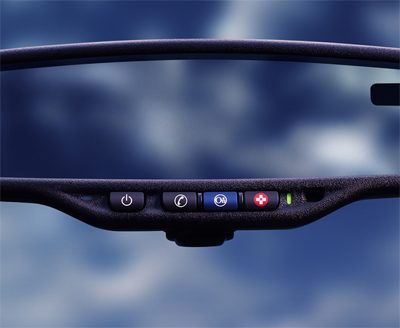
Locate the small control panel in your OnStar-equipped vehicle. It’s usually tucked into the rearview mirror housing, the dashboard, or the overhead console. The hardware is straightforward. Press the blue OnStar button to reach a live or virtual advisor. Hit the red button with the white cross for emergencies. Use the phone icon or “white dot” button to make regular calls. It feels like using a cell phone, but without pulling out a device.
You can’t buy OnStar as a standalone aftermarket kit. You have to buy a car that already has the system hardwired in. The cost varies by make and model. Once you drive off the lot, just press the blue button to subscribe to one of their service plans.
The ecosystem is huge. GM branded vehicles dominate the list: Chevrolet, Pontiac, GMC, Buick, Saturn, and Hummer. But it’s not exclusive to Detroit. Audi, Isuzu, and Volkswagen also offered it. Some models include OnStar as standard equipment. Others bundle it inside an add-on “safety package.” GM had aggressive goals. They planned to make OnStar standard across all their 2007 lineup.
Navigation got a boost in February 2006. OnStar announced Turn by Turn real-time driving navigation. It hit select Buick and Cadillac models first. An extra million 2007 GM models would get it too. By 2010, the goal was to make it standard on every OnStar-equipped car.
How OnStar Got Its Start
OnStar didn’t start as a car feature. It began as location-based technology developed by a team at ExtremeBlue. That’s IBM’s internship program for graduate students in software development and business administration. GM introduced the service in 1996. It was an option on some Cadillac models.
Early consoles came with a physical handset. You had to hold it to your ear. The industry shifted toward convenience. The hands-free, three-button console became standard in 2001.
The connectivity backbone evolved quickly. OnStar’s cellular system started as analog. Then it moved to analog/digital-ready hardware. Most systems are now dual-mode. They use both analog and digital communications. GM planned to switch to all-digital cellular systems by 2008. They have no plans to offer upgrade packages for older, analog-only models. You’re stuck with what you bought.
The Four Pillars Of OnStar Technology
At its core, OnStar relies on four distinct technologies. Cellular connectivity. Voice recognition. GPS. Vehicle telemetry. All services result from one or more of these working in tandem.
The cellular service is voice-activated and hands-free. The console has a built-in microphone. It uses the car’s speakers for output. You don’t dial numbers with your fingers. You speak a phone number or a stored name. The console connects to the Vehicle Comm and Interface Module (VCIM). This module uses a cellular antenna mounted on the roof of the car. It transmits signals to OnStar’s network.
The range is superior to most mobile phones. You get a full three watts of power. A typical cell phone outputs about 0.6 watts. You can still lose service in remote areas. But generally, the coverage is broader. With certain plans, you can use this cellular service exactly like a standard cell phone plan.
Advisor calls rely on voice recognition software. It’s similar to what’s found in hand-held phones. But there’s a unique twist. You can “surf the Web” using the Virtual Advisor automated system. For this, OnStar uses text-to-voice technology called VoiceXML.
When you ask for something like “weather,” the process is complex. The software translates your request into XML (Extensible Markup Language). It matches the request against settings in your OnStar profile. Then it converts the information into VoiceXML. The system reads the data back to you.

The Hardware Under the Hood
OnStar doesn’t just rely on a single component to keep you from getting lost. The heavy lifting for navigation is handled by a module named OnCore. In older vehicle setups, you’d find this GPS hardware bolted on separately from the cellular radio. But in the integrated systems, it’s all part of the VCIM architecture.
Here’s the basic physics at play. The receiver measures how long a radio signal takes to travel from orbiting satellites down to your car. Time equals distance. Simple math. But getting that data requires precision.
When you hit the red button or your vehicle triggers an automatic crash response, OnStar doesn’t guess where you are. They triangulate your position using four distinct satellites. This isn’t just for show. It’s how they get you to the right street corner when every second counts.
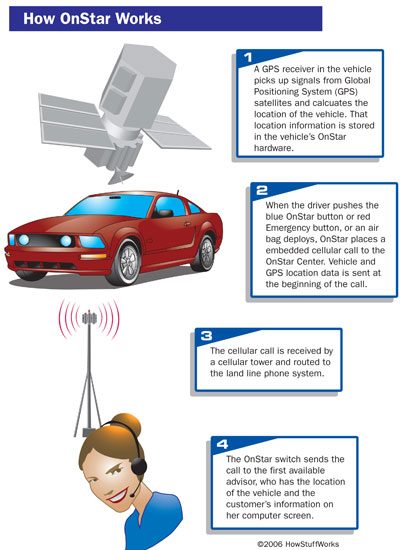
GM calls it the Advanced Automatic Crash Notification System (AACN). Think of it as the automotive equivalent of a black box, with a few key differences. It doesn’t record audio. It doesn’t run continuously. It waits. It sits dormant until the moment of impact triggers a response. Then, and only then, does it begin logging data to help emergency services.
The architecture is simple but robust. Four main components make up the system: sensors, the Sensing Diagnostic Module (SDM), the Vehicle Communication Interface Module (VCIM), and a cellular antenna. The sensors themselves vary in number and placement depending on the specific make and model. You won’t find a one-size-fits-all setup under the hood. But they all do the same job. They detect deformation.
When a crash occurs, these sensors fire data to the SDM. This module is the brain of the operation. It houses an accelerometer that measures the severity of the impact. The system gauges force in multiples of gravity, typically ranging from 1.0 to 2.0 gs depending on the vehicle’s design. Once the SDM determines the event meets its threshold, it forwards the data to the VCIM.
The VCIM takes that raw data and pushes it out through the cellular antenna to the OnStar Call Center. An advisor receives the transmission. They pull up the vehicle’s GPS coordinates. Then, they call the car back. It’s a direct line to the driver. Even if the crash was minor—below the threshold for a measurable impact—the system still triggers if the airbags deploy. That signal alone is enough to prompt an advisor to reach out.
This technology isn’t new. GM started experimenting with event data recorders (EDRs) in the mid-1970s, linking them directly to airbag systems. The tech has evolved significantly since then. By the mid-1990s, GM was installing these units in racecars and select passenger vehicles to gather crash data. Today, the landscape is vastly different. The National Transportation Safety Board (NTSB) estimates that between 65 percent and 90 percent of vehicles in the United States now contain some form of EDR. Most drivers have no idea it’s there.
Regulatory pressure is mounting. In 2004, the National Highway Traffic Safety Administration (NHTSA) recommended that EDRs installed in vehicles built after September 1, 2008, meet a set of minimum standards. The NTSB is pushing further, advocating for mandatory standardized installation across all manufacturers. They want uniform data. They want consistency.
But how does this translate to actual usage? The volume of activity handled by the system is staggering. It’s not just about crashes. It’s about daily utility.
In September 2005, OnStar handled, on average:
-
383,000 calls
-
43,000 remote unlocks
-
900 air bag deployments
-
420 stolen vehicle locations
-
15,000 emergency calls
-
23,000 roadside assistance calls
-
9.5 million hands-free calls
Source: OnStar Press Room
The numbers tell a story of necessity. Thousands of people rely on the system for more than just safety. They use it to get into their cars when keys are locked inside. They use it to track down stolen vehicles. They use it for roadside help. The hands-free call volume alone dwarfs the emergency metrics, showing that connectivity is the primary service for most subscribers. Safety is the hook. Convenience is the retention.
We’ll look next at the specific services OnStar offers and how to actually use them.
Tiers of protection and convenience
You are looking at a monthly bill ranging from roughly $17 to $70. The entry-level Safe and Sound plan is where safety gets its due. Push the blue button. Speak your need. Or dial the toll-free number if you prefer a keyboard.
The core promise here is immediate response.
– Air bag deployment: If the sensors trigger, OnStar tries to call you. Silence? They call emergency services. You say it’s an emergency? They escalate immediately.
– Red button panic: This pins your GPS coordinates and pings the nearest provider. No ambiguity.
– Stolen vehicle tracking: GPS does the heavy lifting once the car is gone.
But global expansion was a different story. North America saw 100 percent brand recognition after a massive marketing push. Elsewhere? Not so much. Opel tried it in Germany. Sales were abysmal. OnStar Europe shut down in November 2005.
Colombia got a local spinoff called ChevyStar in July 2005, attached to certain Chevy models.
Remote hacks and diagnostic depth
Lock your keys inside? The Remote Door Unlock feature sends a cellular data packet to the car’s computer. It clicks open. Simple.
The OnStar Vehicle Diagnostics system is hard-wired into the electrical architecture. The Vehicle Comm and Interface Module doesn’t just listen; it checks engine status, air bags, and anti-lock brakes every single month. Severe issue? An advisor calls. You also get an e-mail report. It’s proactive maintenance wrapped in a subscription.
Access to Hands-Free Calling offers two paths. Buy minutes in blocks or subscribe directly to Verizon Wireless. Verizon users can forward calls to the module and share minutes.
Roadside Assistance is automated. They call the tow truck. They find gas. They change the flat. No haggling.
AccidentAssist provides a step-by-step checklist for post-crash protocol. They can even call your insurance provider for you.
Lost in a parking lot? Remote Horn and Lights makes the car shout at you. Advisor activates the horn. Flash the lights. Find it.
The Virtual Advisor interface
This is where the Virtual Advisor lives. It uses voice activation and text-to-speech.
- News feeds (national, international, business)
- Sports scores
- Stock quotes
- Weather for any US ZIP or Canadian Postal Code
Set your preferences on the web portal. Press the white dot or phone button. Use voice commands. Say “Get my weather.” The GPS locates you. The advisor reads the forecast.
Note the limitations. Virtual Advisor runs on pre-paid minutes. It often conflicts with the Verizon plan depending on the car model.
Higher tier services
The Directions and Connections plan bundles the safety features with:
– Driving Directions
– RideAssist: Can’t drive? They call a taxi.
– Information/Convenience Services: Find a hotel. Find an ATM. Nearby.
Then there is the Luxury and Leisure plan. It includes everything in Directions and Connections plus Personal Concierge Services. This acts as a hotel-style concierge. OnStar maintains a proprietary database of businesses. Search by name, type, or location.
OnStar also partnered with XM Radio. Factory-installed XM? The advisor helps set up the subscription. Both services share the same antenna.
Security vulnerabilities?
The question always arises: Can car thieves use OnStar?
The logic seems sound. Remote unlock implies remote theft. But the architecture differs from standard keyless entry fobs. Those use RF signals. OnStar uses the cellular network.
More importantly, security protocols block unauthorized access. To unlock the doors, you must provide an account number and a PIN. No PIN? No unlock. The owner holds the keys to the kingdom.
The same applies to Stolen Vehicle Location Assistance. OnStar only tracks a vehicle at the owner’s request. Or in cooperation with police. You aren’t broadcasting your location to every thief on the highway.
Now, let’s look at some of the controversy surrounding OnStar.
Most OnStar subscribers don’t bat an eye. The testimonials on the official website are glowing. But a vocal minority sees something else entirely. They call it Big Brother. To them, the service isn’t a safety net; it’s a surveillance tool. The fear? A total invasion of privacy.
The Data Trail
It’s not just about crash severity. The Vehicle Comm and Interface Module is a data hoarder. It logs seatbelt usage. It records speed. It captures telemetry from seconds before, during, and after a collision. That raw data sits in the system for roughly 45 days.
The Call Center is even greedier. It keeps that information for over a year. Why? Quality control. Follow-up on complaints. They say they hand this data to auto manufacturers to make cars safer. Critics disagree. They see a roadmap for abuse.
OnStar shares personal info to comply with legal requirements and valid court orders.
The list of potential misuse is long. Manufacturers could use the logs to clear themselves of wrongdoing. Warranty repairs might get denied if the data suggests driver error. Insurance premiums could spike based on your driving habits. Or coverage could simply vanish. It’s speculative, sure. But the mechanism is there.
OnStar’s Privacy Policy is explicit. They share data to comply with laws and exigent circumstances. They also share with subsidiaries. GMAC, the insurance arm, is one of them. The legal precedent is chilling. A 2003 United States Appeals Court ruling suggested the government could use the onboard cell phone to eavesdrop on drivers. It didn’t name OnStar directly. The implication was unmistakable.
Modifying the Module
GPS latency is a frustration for some. You have to call the center to get navigation data. So, users hacked the system. Websites now provide step-by-step guides to bypass the central hub and access GPS data in real-time. GM doesn’t endorse this. They won’t warn you, either. If you tweak the module and break it, OnStar has no obligation to fix it. You’re on your own.
OnStar dominates the US market. It isn’t the only game in town.
Ford has RESCU and VEMS. Volvo offers OnCall. BMW provides Assist. Mercedes-Benz runs TeleAid and Command. These systems do similar work. They connect cars to emergency services. But the tech landscape is shifting.
Japanese automakers used to license OnStar technology. Toyota and Honda dropped it. They built their own systems instead. Toyota created G-book. Honda developed Internavi. Nissan launched CarWings. All three are exclusive to Japan. The global telematics war is fragmented.
Quick Facts
What is OnStar in a car? It’s a voice-activated service by General Motors. It helps people get out of auto emergencies. It offers other handy services.
How much does OnStar cost per month? The basic plan is $34.99. GM sets the price.
Is the OnStar Basic Plan free? Owners of GM vehicles get it free for the first five years of ownership.
Can you activate OnStar without being in the car? No. You must be inside the vehicle to activate it.
Is OnStar being discontinued? There are no current plans to discontinue the service.
More Links
For deeper dives into telematics and related automotive tech, check the links on the next page.